Showing posts with label trackpoint. Show all posts
Showing posts with label trackpoint. Show all posts
0
So here is an example of how this can be done:
1. create a file /etc/hal/fdi/policy/mouse-wheel.fdi with a content like: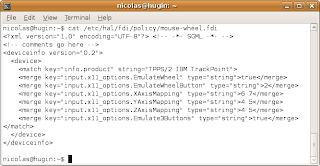 2. restart HAL, check the config is taken into account then restart your X server
Posted on 4/27/2009 07:14:00 pm by Nicolas and filed under
how-to,
linux,
open source,
trackpoint,
ubuntu,
X300
After yesterday's update on evdev on Fedora 10, I starting wondering if this could be portable on Ubuntu to configure the old EmulateWheel functionalities. evdev was indeed ported to Ubuntu, so, provided the version was compatible (>2.1) then there was no reason why this would not be valid... And indeed it is! It also offers the huge advantage ofnot having to play with the xorg.conf file, which is always a risk given it impacts the behaviour of the whole X server.So here is an example of how this can be done:
1. create a file /etc/hal/fdi/policy/mouse-wheel.fdi with a content like:
 2. restart HAL, check the config is taken into account then restart your X server
0
But it's probably worth another separate post...
It still evolves around the topic of configuring the "how wonderful!" middle button horizontal scrolling. I was not so sure how I had worked it out on Fedora 10, so I just rebooted to this OS and confirmed that the tweak with the "mouse" driver does not work on this distro. As said below, it *does* work with Fedora 9 though. What happens is that this button is "emulated" via HAL. No point looking for the xorg.conf file as there should not be any such file...
To configure the TrackPoint scroll, you have to:
1. Edit the config file /usr/share/hal/fdi/policy/10osvendor/10-x11-input.fdi
Basically, just add lines similar to the following in the relevant part of the file:
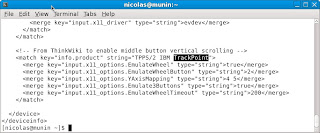 ... by relevant, I mean you'll have to make sure you're in the correct section of the file as markup languages are sensitive to that... If you don't see what this means, have a look at the markup language article on Wikipedia.
2. Then restart HAL and check the modifications appear among the
device options that you can check via the output of lshal. Typically:
[nicolas@munin ~]$ lshal | grep TrackPoint
info.product = 'TPPS/2 IBM TrackPoint' (string)
input.product = 'TPPS/2 IBM TrackPoint' (string)
3. Finally restart the X server and enjoy some nice and smooth vertical scrolling!
NDLR: once again, from the above extract you'll notice the FDI file does not enable horizontal scrolling... same reason as below: Firefox would understand it has a backward/forward instruction...
For reference, here is the original article on Thinkwiki.
I am also aware that it used to *not* work on earlier versions of evdev, so you'll have to make you run at least version 2.1.
Posted on 4/26/2009 05:34:00 pm by Nicolas and filed under
fedora,
how-to,
linux,
open source,
trackpoint,
X300
It's a sort of edit to my previous post - see just below for the original story ;)But it's probably worth another separate post...
It still evolves around the topic of configuring the "how wonderful!" middle button horizontal scrolling. I was not so sure how I had worked it out on Fedora 10, so I just rebooted to this OS and confirmed that the tweak with the "mouse" driver does not work on this distro. As said below, it *does* work with Fedora 9 though. What happens is that this button is "emulated" via HAL. No point looking for the xorg.conf file as there should not be any such file...
To configure the TrackPoint scroll, you have to:
1. Edit the config file /usr/share/hal/fdi/policy/10osvendor/10-x11-input.fdi
Basically, just add lines similar to the following in the relevant part of the file:
 ... by relevant, I mean you'll have to make sure you're in the correct section of the file as markup languages are sensitive to that... If you don't see what this means, have a look at the markup language article on Wikipedia.
2. Then restart HAL and check the modifications appear among the
device options that you can check via the output of lshal. Typically:
[nicolas@munin ~]$ lshal | grep TrackPoint
info.product = 'TPPS/2 IBM TrackPoint' (string)
input.product = 'TPPS/2 IBM TrackPoint' (string)
3. Finally restart the X server and enjoy some nice and smooth vertical scrolling!
NDLR: once again, from the above extract you'll notice the FDI file does not enable horizontal scrolling... same reason as below: Firefox would understand it has a backward/forward instruction...
For reference, here is the original article on Thinkwiki.
I am also aware that it used to *not* work on earlier versions of evdev, so you'll have to make you run at least version 2.1.
0
Also, I find the middle button quite practical for scrolling. This can be configured via the xorg mouse input driver. Unfortunately, this is no longer possible with recent Linux distros (typically Fedora starting from version 9 or also Ubuntu from 8.10), the evdev driver is taking precedence, even though another driver is explicitly configured in xorg.conf (explanations from Red Hat developers can be found in this bug opened against Fedora 9). The correct solution is to disable this auto-detection by turning the "AutoAddDevices" server flag to "false".
Here are the relevant sections in my /etc/X11/xorg.conf:
Section "ServerFlags"
Option "AutoAddDevices" "false"
EndSection
Section "InputDevice"
Identifier "Trackpoint"
Driver "mouse"
Option "CorePointer"
Option "Device" "/dev/input/mice"
Option "Protocol" "ExplorerPS/2"
Option "Emulate3Buttons" "off"
Option "EmulateWheel" "on"
Option "EmulateWheelTimeOut" "200"
Option "EmulateWheelButton" "2"
Option "YAxisMapping" "4 5"
# Option "XAxisMapping" "6 7"
Option "ZAxisMapping" "4 5"
EndSection
Please note from the above that the middle button is only enabled for vertical scrolling. I'm barely using horizontal scrolling and it gets interpreted in Firefox as backwards/forwards which can get quickly annoying : ) Hence its being commented.
Posted on 4/26/2009 03:22:00 pm by Nicolas and filed under
fedora,
how-to,
linux,
open source,
trackpoint,
ubuntu,
X300
I've been asked recently my prefered settings for the pointing devices on Thinkpads... I'm addicted to the Trackpoint (the little red strawberry encrusted between the G, H and B keys) and the Trackpad (the flat sensitive surface also referred to as touchpad) generally disrupts me as I tend to accidentally touch it with the palm of my hand, so I generally disable it from the BIOS.Also, I find the middle button quite practical for scrolling. This can be configured via the xorg mouse input driver. Unfortunately, this is no longer possible with recent Linux distros (typically Fedora starting from version 9 or also Ubuntu from 8.10), the evdev driver is taking precedence, even though another driver is explicitly configured in xorg.conf (explanations from Red Hat developers can be found in this bug opened against Fedora 9). The correct solution is to disable this auto-detection by turning the "AutoAddDevices" server flag to "false".
Here are the relevant sections in my /etc/X11/xorg.conf:
Section "ServerFlags"
Option "AutoAddDevices" "false"
EndSection
Section "InputDevice"
Identifier "Trackpoint"
Driver "mouse"
Option "CorePointer"
Option "Device" "/dev/input/mice"
Option "Protocol" "ExplorerPS/2"
Option "Emulate3Buttons" "off"
Option "EmulateWheel" "on"
Option "EmulateWheelTimeOut" "200"
Option "EmulateWheelButton" "2"
Option "YAxisMapping" "4 5"
# Option "XAxisMapping" "6 7"
Option "ZAxisMapping" "4 5"
EndSection
Please note from the above that the middle button is only enabled for vertical scrolling. I'm barely using horizontal scrolling and it gets interpreted in Firefox as backwards/forwards which can get quickly annoying : ) Hence its being commented.
